Start Small, Then Scale with Value
Many companies are interested in AI agents.
They imagine a future where AI can monitor production, analyze problems, recommend actions, coordinate systems, and support better business decisions.
This vision is powerful. However, many AI projects fail because they try to build too much at the beginning.
A company may want to build a complete AI agent system that connects ERP, MES, equipment data, quality records, inventory, maintenance, scheduling, and supplier information all at once. On paper, this sounds impressive. In practice, it often becomes too complex, too slow, and too difficult to implement.
The better approach is to start small.
Companies do not need to build a full AI agent system from day one. A more practical way is to begin with a clear business problem, prove value in a focused use case, and gradually expand toward a broader decision-support system.
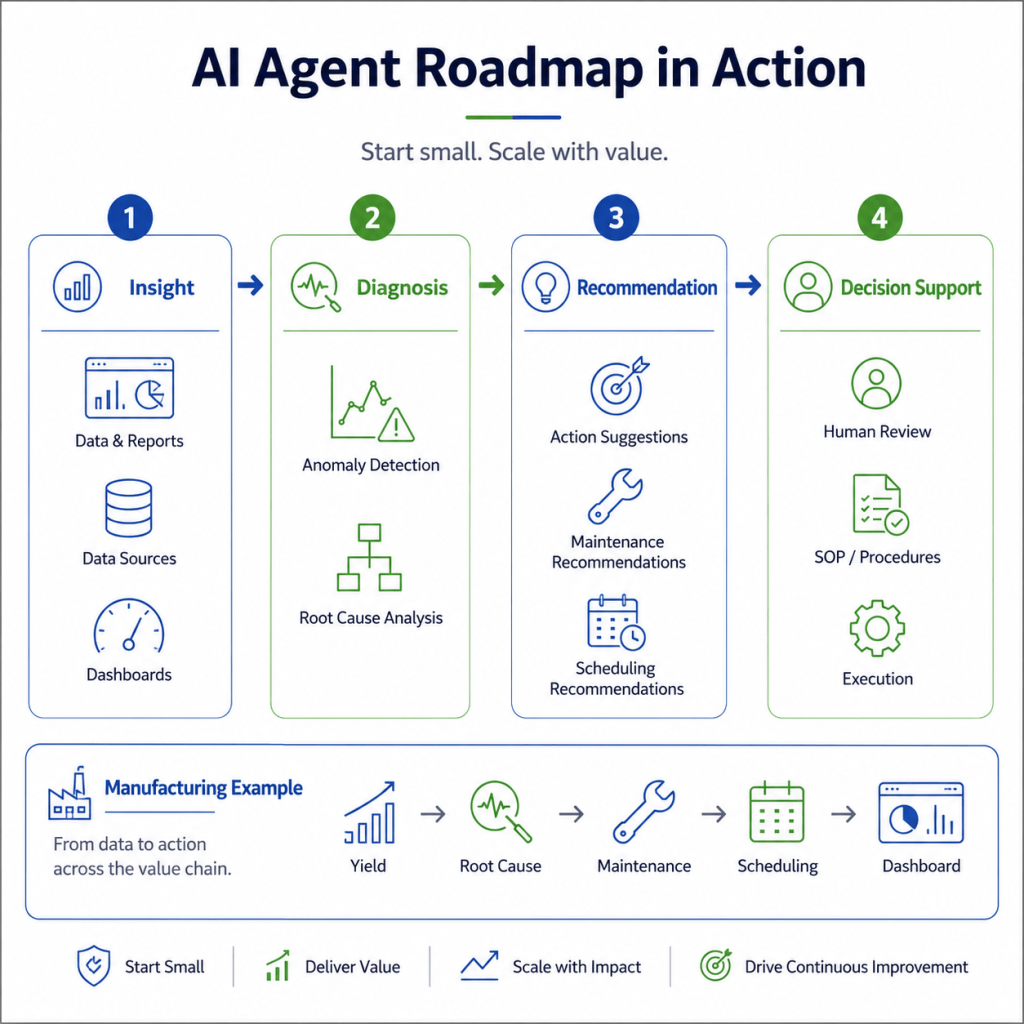
In smart manufacturing, AI agent adoption should be treated as a roadmap.
It should move step by step:
Insight → Diagnosis → Recommendation → Decision Support
This roadmap helps companies reduce risk, build trust, and create business value gradually.
1. Why Companies Should Start Small
Many AI projects fail not because the technology is impossible, but because the scope is too broad.
When an AI project tries to solve too many problems at once, several issues often appear.
First, the data becomes difficult to integrate. Manufacturing data is usually spread across many systems, such as ERP, MES, equipment platforms, quality systems, warehouse systems, and maintenance records. If the project tries to connect everything immediately, implementation may become slow and unstable.
Second, the business objective becomes unclear. A project that tries to improve yield, reduce downtime, optimize scheduling, predict maintenance, and monitor suppliers at the same time may lose focus. Without a clear problem, it becomes difficult to measure success.
Third, users may not trust the system. If the AI agent suddenly recommends high-impact decisions without a clear explanation, engineers and managers may hesitate to use it.
Fourth, the organization may not be ready for automation. Even if AI can generate recommendations, companies still need SOP alignment, approval rules, human review, and traceability before using AI in real operations.
This is why starting small is important.
A focused AI agent project should begin with one clear use case, such as:
- yield loss analysis,
- abnormal event summary,
- downtime classification,
- maintenance recommendation,
- production scheduling support,
- or supplier risk monitoring.
The goal is not to build everything immediately.
The goal is to prove that AI agents can help people make better decisions in a specific, meaningful scenario.
2. From AI Tools to AI Agent Roadmap
Many companies already use AI tools for analytics, dashboards, prediction, or reporting.
However, an AI agent is more than a model or a dashboard.
An AI agent should be able to connect data, understand context, reason about a problem, suggest actions, and support human decision-making.
This means that AI agent development should be designed as a maturity journey.
At the early stage, AI may only help summarize data.
At the next stage, it may help diagnose problems.
After that, it may recommend actions.
Finally, it may become part of a decision-support workflow that includes SOPs, system tools, human review, and feedback learning.
This staged approach is important because each stage builds the foundation for the next one.
A company should not jump directly to full decision support before it has reliable data, clear context, trusted diagnosis, and useful recommendations.
The roadmap should move from visibility to action.
3. Stage 1: Insight Agent
The first stage is the Insight Agent.
At this stage, the AI agent helps users understand what is happening.
It does not need to make complex decisions yet. Its main purpose is to collect data, organize information, summarize key signals, and generate reports.
For example, an Insight Agent may help answer:
- What happened during the last shift?
- Which production lines had lower yield?
- Which machines had abnormal downtime?
- Which work orders were delayed?
- Which defect types increased?
- Which KPIs changed compared with the previous week?
This stage is valuable because many manufacturing teams still spend significant time collecting and preparing information manually.
An Insight Agent can reduce this burden by turning fragmented data into structured summaries.
Business Value of Stage 1
The value of an Insight Agent includes:
- faster reporting,
- better visibility,
- less manual data preparation,
- more consistent KPI tracking,
- and earlier awareness of production issues.
At this stage, the AI agent supports awareness.
It helps people see the situation more clearly.
Example
In a yield monitoring scenario, the Insight Agent may generate a daily summary:
“Line 3 had a yield drop from 97.8% to 94.2%. The main defect type was solder bridging. The issue appeared mainly during the night shift.”
This does not yet explain the root cause, but it helps the team identify where to look.
4. Stage 2: Diagnosis Agent
The second stage is the Diagnosis Agent.
At this stage, the AI agent goes beyond reporting and starts to help analyze why something happened.
It connects production data with context, such as product model, line, shift, material batch, process parameter, maintenance history, and historical cases.
A Diagnosis Agent may help answer:
- Why did yield decrease?
- What factors changed before the abnormal event?
- Is the issue related to equipment, material, process, or operator conditions?
- Has a similar problem happened before?
- Which root causes are most likely?
- Which data supports the diagnosis?
This stage is important because many manufacturing problems are not caused by a single factor.
A yield issue may be related to material variation.
A downtime issue may be related to maintenance delay.
A delivery delay may be related to both machine capacity and material availability.
A quality problem may be connected to a recent changeover or parameter drift.
The Diagnosis Agent helps users narrow down possible causes.
It does not replace engineers. Instead, it helps engineers investigate faster.
Business Value of Stage 2
The value of a Diagnosis Agent includes:
- faster root cause analysis,
- fewer repeated investigations,
- better use of historical cases,
- more structured problem-solving,
- and stronger process learning.
At this stage, the AI agent supports understanding.
It helps people move from “what happened” to “why it happened.”
Example
For a yield loss case, the Diagnosis Agent may suggest:
“The yield drop may be related to material batch B-21. Similar defect patterns occurred in two previous lots using the same supplier. Equipment temperature also showed a mild upward drift before the defect rate increased.”
This type of analysis helps the team focus on the most likely causes.
5. Stage 3: Recommendation Agent
The third stage is the Recommendation Agent.
At this stage, the AI agent does not only diagnose the problem. It also suggests possible actions.
A Recommendation Agent may help answer:
- What should we check first?
- Which corrective action is most suitable?
- Should maintenance be notified?
- Should production continue under monitoring?
- Should a batch be held for inspection?
- Should a work order be rescheduled?
- Should a supplier issue be escalated?
- Which action has the lowest operational risk?
The key difference between diagnosis and recommendation is action orientation.
The AI agent begins to connect problems with possible solutions.
However, recommendations should still be controlled. The system should clearly show the evidence, expected benefit, risk level, and whether human approval is required.
Business Value of Stage 3
The value of a Recommendation Agent includes:
- faster response,
- more consistent corrective actions,
- better prioritization,
- reduced decision delay,
- and stronger alignment with SOPs.
At this stage, the AI agent supports action planning.
It helps people decide what to do next.
Example
For a production abnormality, the Recommendation Agent may suggest:
“Recommended action: inspect soldering temperature settings, compare material batch B-21 with previous stable batches, and request process engineer review before continuing high-volume production.”
This recommendation is useful because it connects diagnosis with practical next steps.
6. Stage 4: Decision Support Agent
The fourth stage is the Decision Support Agent.
At this stage, the AI agent becomes part of a broader decision workflow.
It integrates data, diagnosis, recommendations, SOPs, system tools, human review, and traceability.
A Decision Support Agent may help answer:
- Which action should be approved?
- Does the recommendation follow SOP?
- Is the risk level low, medium, or high?
- Who needs to review the decision?
- Which system should be updated?
- Should the action be executed automatically or manually?
- What outcome should be tracked afterward?
- How should the system learn from the result?
This is the most mature stage of AI agent adoption.
The agent is no longer only a reporting tool or recommendation engine. It becomes a controlled decision-support system.
It may support actions such as:
- maintenance request creation,
- schedule adjustment,
- supplier notification,
- quality hold recommendation,
- production priority update,
- or management dashboard update.
However, important decisions should still include human review, especially when they affect product quality, production continuity, customer delivery, or compliance.
Business Value of Stage 4
The value of a Decision Support Agent includes:
- better decision quality,
- faster execution,
- stronger governance,
- improved traceability,
- better cross-functional coordination,
- and continuous improvement.
At this stage, the AI agent supports controlled decision-making.
It helps companies move from isolated AI tools to enterprise-level decision intelligence.
Example
For a yield loss problem, the Decision Support Agent may create a structured workflow:
- Detect yield drop.
- Identify likely root causes.
- Recommend corrective actions.
- Check SOP and risk level.
- Request engineer approval.
- Notify production and quality teams.
- Record decision and result.
- Learn from the outcome.
This is what makes AI agents practical in real manufacturing environments.
7. Example Roadmap: From Yield Loss Analysis to Decision Intelligence
A practical AI agent roadmap can start with a focused use case, such as yield loss analysis.
Yield loss is a good starting point because it is easy to understand and directly connected to business performance.
The roadmap may evolve as follows.
Step 1: Yield Loss Insight
The first step is to summarize yield performance.
The AI agent identifies which lines, products, shifts, or work orders have abnormal yield changes.
The goal is visibility.
Step 2: Root Cause Analysis
The next step is to analyze why yield loss occurred.
The AI agent connects yield data with defect types, material batches, equipment signals, process parameters, and historical cases.
The goal is diagnosis.
Step 3: Maintenance Recommendation
If the root cause may be related to equipment conditions, the AI agent recommends maintenance inspection or process checks.
The goal is action recommendation.
Step 4: Production Scheduling Support
If yield loss affects expected output, the AI agent can support rescheduling.
It may suggest moving urgent orders to another line, adjusting capacity plans, or notifying production control.
The goal is operational response.
Step 5: Supplier Risk Monitoring
If repeated yield issues are related to certain material batches or suppliers, the AI agent can support supplier risk monitoring.
The goal is upstream prevention.
Step 6: Decision Intelligence Dashboard
Finally, the AI agent can connect yield, maintenance, scheduling, supplier risk, and delivery impact into a decision intelligence dashboard.
The goal is enterprise-level decision support.
This roadmap shows how a company can start from one specific problem and gradually expand toward a broader decision system.
The key is to build value step by step.
8. How to Choose the First AI Agent Use Case
Choosing the right first use case is critical.
A good starting use case should have five characteristics.
8.1 Clear Business Pain
The problem should matter to the business.
Examples include yield loss, downtime, delivery delay, maintenance response time, or repeated quality issues.
8.2 Available Data
The company should already have enough data to support the use case, even if the data is not perfect.
Starting with impossible data integration will slow down the project.
8.3 Clear Users
The use case should have real users, such as engineers, production planners, quality teams, or maintenance staff.
AI agents should support actual work, not only generate technical output.
8.4 Measurable Value
The project should have clear success measures, such as reduced investigation time, improved response speed, fewer repeated issues, better delivery stability, or reduced manual reporting effort.
8.5 Manageable Risk
The first use case should not require high-risk automation.
It is better to start with insight, diagnosis, or recommendation before moving to automatic execution.
This helps build trust.
9. Practical Implementation Principles
A successful AI agent roadmap should follow several principles.
9.1 Start with Decision Needs, Not Technology
The first question should not be:
Which AI model should we use?
The better question is:
Which decision do we want to improve?
AI agents should be designed around decision workflows, not only technical capabilities.
9.2 Build Context Before Automation
AI agents need context to make useful recommendations.
This means connecting data with production line, product, work order, shift, material batch, equipment status, and business priority.
Without context, AI may generate recommendations that are technically correct but operationally weak.
9.3 Keep Human Review in the Workflow
Human review is important, especially in manufacturing.
The roadmap should define which actions can be automated and which actions require human confirmation.
This improves safety, trust, and accountability.
9.4 Connect AI with SOPs
AI recommendations should not be isolated from company procedures.
They should align with SOPs, quality rules, maintenance policies, and change management requirements.
9.5 Record Decisions and Outcomes
Every recommendation, approval, action, and result should be recorded.
This creates traceability and supports continuous learning.
The AI agent should become better over time.
10. Common Mistakes to Avoid
Companies should avoid several common mistakes when building AI agents.
Mistake 1: Starting Too Broad
Trying to build a complete enterprise AI agent from the beginning often creates delays and confusion.
Start with one valuable use case.
Mistake 2: Focusing Only on Models
AI agents are not only models.
They require data integration, context, workflows, SOPs, human review, and feedback loops.
Mistake 3: Ignoring User Adoption
If users do not trust or understand the AI agent, the project will not create value.
The system must provide clear explanations and fit into daily work.
Mistake 4: Automating Too Early
Automation without control may create operational risk.
Begin with recommendations and human review before moving to automated execution.
Mistake 5: Not Measuring Business Value
Technical accuracy is not enough.
The project should measure operational and business outcomes, such as response time, issue resolution speed, schedule stability, or delivery risk reduction.
11. From Single Task to Enterprise Decision System
The long-term value of AI agents comes from connecting multiple use cases into a broader decision system.
For example, a yield loss agent may later connect with:
- maintenance recommendation,
- production scheduling,
- supplier risk monitoring,
- quality control,
- delivery risk management,
- and management decision dashboards.
At that point, the AI agent system becomes more than a set of isolated tools.
It becomes a decision intelligence layer for smart manufacturing.
This layer helps the enterprise connect data, context, reasoning, actions, and learning.
The company can then move from reactive problem-solving to proactive decision support.
Conclusion: AI Agent Adoption Is a Roadmap, Not a One-Time Project
Building AI agents for smart manufacturing is not a one-time implementation.
It is a roadmap.
Companies do not need to build a complete AI agent system immediately. The practical approach is to start with a focused business problem, prove value, build trust, and gradually expand.
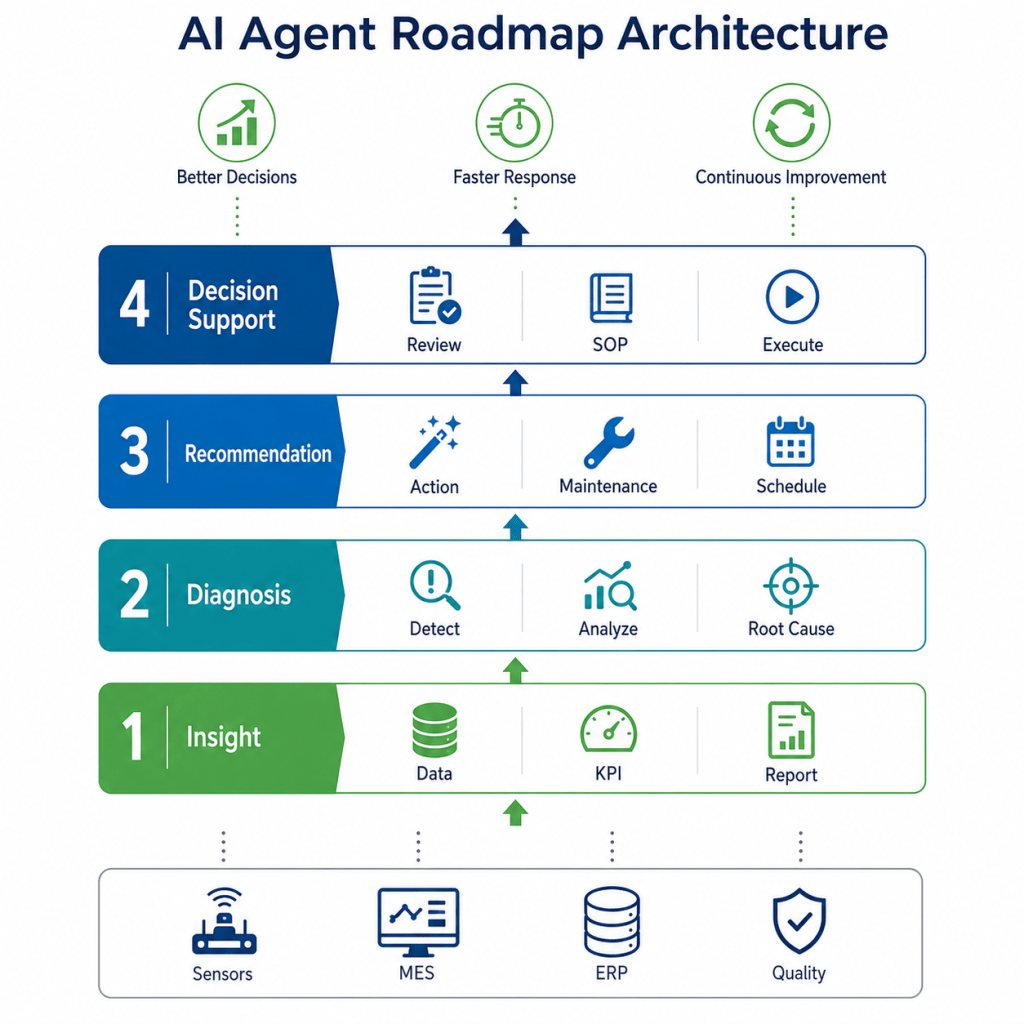
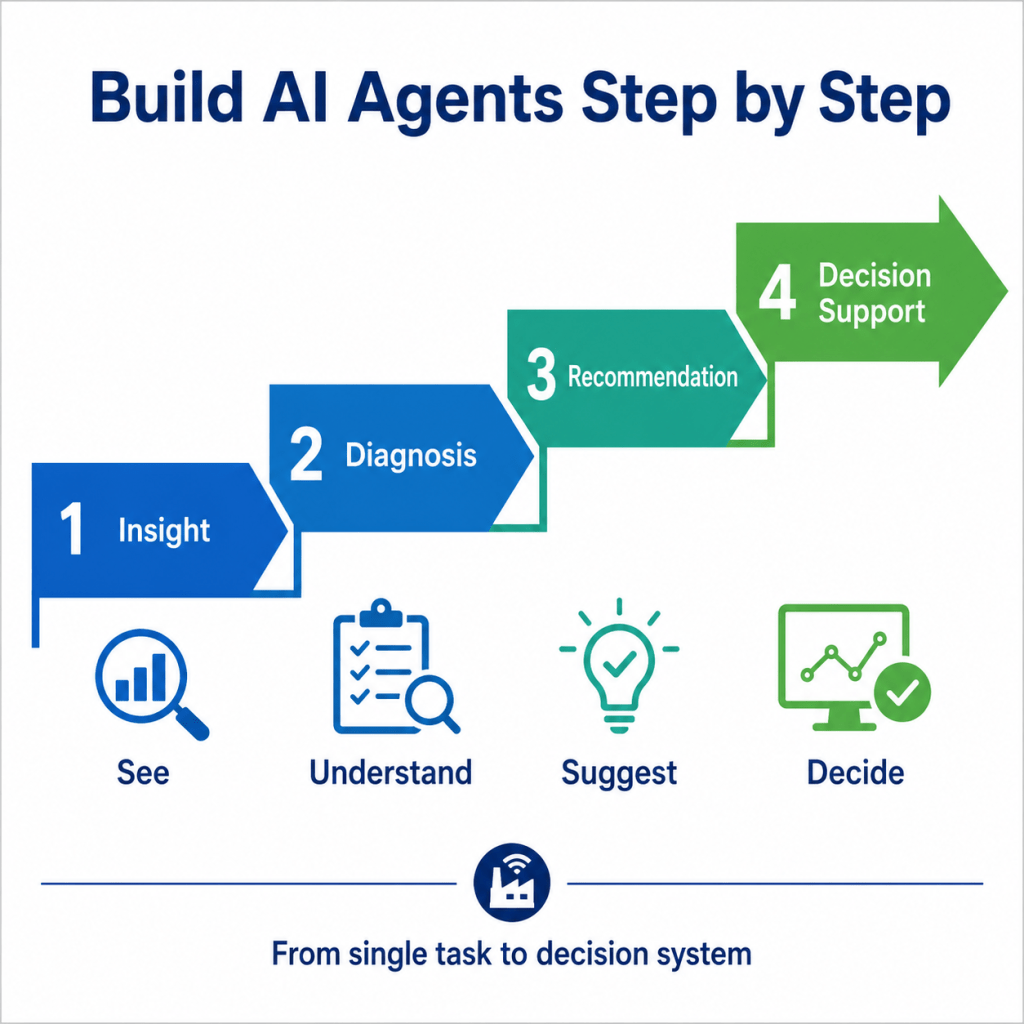
The four stages of AI agent adoption are:
Insight → Diagnosis → Recommendation → Decision Support
An Insight Agent helps users see what is happening.
A Diagnosis Agent helps users understand why it happened.
A Recommendation Agent helps users decide what to do next.
A Decision Support Agent connects AI recommendations with SOPs, human review, system tools, and real operational decisions.
This roadmap allows companies to start small, reduce risk, and scale with value.
The future of smart manufacturing will not be built by isolated AI models alone.
It will be built by AI agents that connect data, context, people, processes, and decisions.
The goal is not simply to automate more tasks.
The goal is to help enterprises make better decisions, faster and with greater confidence.
 Willie Lin | Smart Manufacturing, Agentic AI & Decision Intelligence
Leave a comment